
This is certainly an exciting time for me. A release of dynamic silverlight that supports IronRuby, Asp.NET MVC that can be used to in conjunction with that.
I think that web applications and the way the web looks will severely change in the near future.
Anyway not only the people at Microsoft have been busy also the guys from sapphiresteel have been busy lately. They releases a really cool update to their Ruby In Steel product. A visual rails work bench and support for developing IronRuby apps with visual studio !
I finally got round to doing some installs/upgrades on my machine and played around with the color scheme until it suited me. I’ll post that here.
I use Resharper 4 as well as IronRuby and in Resharper I have code analysis turned on with color identifiers. So my scheme needs to support those.
I don’t like bright colors nor a totally black background, they have the same effect as a white background on me. I get migraines and can’t concentrate as long as I need to. (the latter may also be due to undiagnosed ADD).
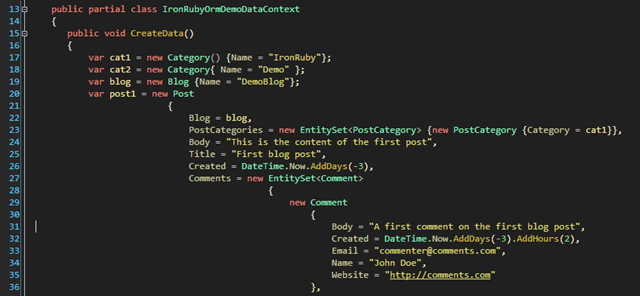
So in C# with resharper the code looks like this:
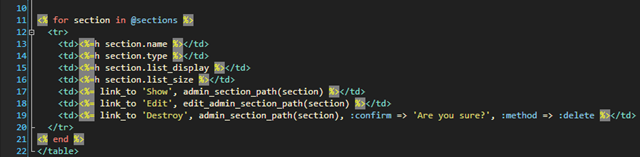
I do lot’s of webdevelopment but I haven’t tuned the colors for xaml yet. Will probably get round to doing that next weekend. This is how the html colors look (this is from rails html but html looks the same).
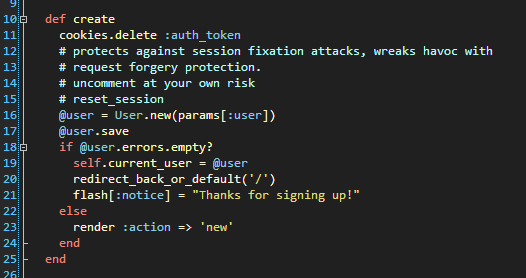
Then there still is ruby to show and a config file.
Here’s ruby:
And lastly the config files:

Get DimmedInkResharperRubyInSteel (Visual Studio 2008)
Get DimmedInkResharperRubyInSteel (Visual Studio 2005)