Using IronRuby with RubyMine

Using IronRuby with RubyMine
by Ivan Porto Carrero
Posted May 2nd, 2009 at 2:50 pm

RubyMine was released earlier this week. I’ve used rubymine in the past and was very impressed with the IDE, so much that I’m silently hoping the guys from Jetbrains would do a C# IDE too. I’d probably buy that one as well, but for now I’ll settle for Resharper with Visual studio.

By default Rubymine won’t accept IronRuby as a ruby SDK, but I asked for help in the twitterverse and got it (http://twitter.com/iRomeo/statuses/1677867948).
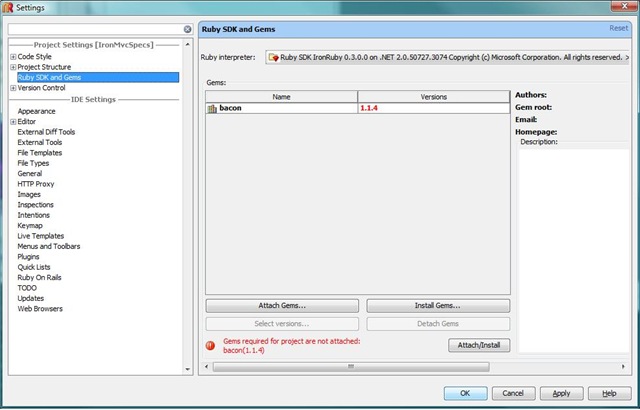
settings_rubymine

Just symlinking didn’t really work because the ruby.exe listens to –version for getting its version number.  IronRuby on the other hand listens to –v to get its version number.  The solution to that is to create a batch file that will translate the –version  modifier to –v.

So instead of symlinking the ir.exe to a name that starts with ruby I created a batch file called ruby_iron.cmd with the following content.

@echo off
set IR_CMD="%~dp0ir.exe"
if "%1"=="--version" ( GOTO RUBY_VERSION )
GOTO RUBY
:RUBY_VERSION
%IR_CMD% -v
goto QUIT
:RUBY
%IR_CMD%
:QUIT

With that ruby_iron.cmd file in place you can just add IronRuby as an SDK in RubyMine.

Enjoy :)

10 ResponsesLeave a comment
  • [...] Note: this entry was cross posted from flanders.co.nz. [...]

  • Roman Chenyatchik
    May 2, 2009 at 16:26

    Ivan,
    Thank you for detailed instructions. I posted link to this article in RubyMine forum – http://www.jetbrains.net/devnet/thread/281493?tstart=0

  • progg.ru
    May 4, 2009 at 15:16

    Using IronRuby with RubyMine…

    Thank you for submitting this cool story – Trackback from progg.ru…

  • Roman Chenyatchik
    May 7, 2009 at 14:41

    Ivan, I’ve noticed a bug in your script. You don’t populate original argument to ir.exe, should be

    %IRCMD% %*
    ..
    E.g thus on your screenshot RubyMine displays such huge and strange name for IronRuby sdk

  • Ryan Riley
    May 17, 2009 at 05:39

    Thanks for posting this. I’m no expert on cmdlets, so I have a couple of questions. First, where do I put the file? Do I stick it in the same directory as ir.exe? Second, what does “%~dp0ir.exe” mean? Thanks!

  • Ryan Riley
    May 17, 2009 at 06:23

    Also, how would you compare this with the Ruby in Steel VS add-in from Sapphire Steel? Looks like RubyMine would compete with the Developer edition, which is $200, less the refactor tools.

  • ivan
    May 17, 2009 at 07:57

    Ryan,
    you should put the file in the same folder as ir.exe.
    %~dp0ir.exe means that it should expand the path it finds ir.exe in

    Rubymine would be a competitor to ruby in steel developer edition. I’ve got both but I tend to use rubymine more. I _love_ refactoring help you get from rubymine. Ruby In Steel only gives me ruby integration in visual studio but so far even their autocomplete hasn’t worked for me, nor has the debugging ever worked as i would have wanted it to.
    So currently my vote goes to Rubymine

  • Ryan Riley
    May 18, 2009 at 01:11

    Thanks, Ivan. That is a great response, and I’m looking forward to using RubyMine for IronRuby development, as well as continuing to read your book. Great start in chapter 1, so far!

  • rifraf
    August 3, 2009 at 20:33

    Seems to work ‘out of the box’ on IronRuby 0.9 though you need to set the startup options to ‘-e STDOUT.sync=true;STDERR.sync=true;load($0)’

  • angel
    February 13, 2010 at 04:36

    Hi..I try it but I’ve a error when run my project….”can’t convert NilClass into String (TypeError)”…what am I do bad??..thanks!!

Add a commentGet a Gravatar

* Name

* Email Address

Website Address

You can usethese tags:
<a href="" title=""> <abbr title=""> <acronym title=""> <b> <blockquote cite=""> <cite> <code> <del datetime=""> <em> <i> <q cite=""> <strike> <strong>
Around The Site
Categories
Archives
Tags