
I do development on both the Mac and windows. I prefer to use git as my source control these days and have done so for the past year or so. Git is great, I love it. I love the ease of branching a lot too. I’ll often just branch of locally just to play around with an idea without affecting the master branch.
But having many branches can be confusing at times, especially in my case as I can only remember what I was doing for 5 seconds. So sometimes I mess up a perfectly good branch because of the confusion.
On windows I use Powershell as my command-line. I don’t know much of powershell scripting. To be honest I mainly started using it because then I wouldn’t constantly get an error when I typed ls instead of dir :) However since then I did explore that environment a little and it does give me easy access to the CLR and a way to create very very powerful batch files, although I do most of my scripting in Ruby these days. It also allows you to customize your prompt. You need to allow scripts unrestricted access for this to work. You can do that by entering Set-ExecutionPolicy Unrestricted at a powershell prompt. Then you close powershell and create a file in %MYDOCUMENTS%\WindowsPowershell called profile.ps1
<span class="kwrd">function</span> prompt


{


    $host.ui.rawui.WindowTitle = $(get-location)


    Write-Host (<span class="str">"+ "</span> + $(get-location)) -foregroundcolor Yellow


        $branches = <span class="str">""</span>


        git branch | <span class="kwrd">foreach</span> {


            <span class="kwrd">if</span>($_ <span class="preproc">-match</span> <span class="str">"^\*\s(.*)"</span>){


                $branches += $matches[1]


            }


        }


    <span class="kwrd">if</span>($branches){


        Write-Host (<span class="str">"("</span> + $branches + <span class="str">") "</span>) -nonewline -fore Cyan


    }


    Write-Host (<span class="str">"»"</span>) -nonewline -foregroundcolor Green


    <span class="kwrd">return</span> <span class="str">" "</span>


}
The result of this prompt looks like this:
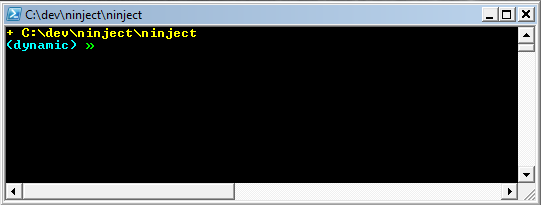
In bash I use a .bashrc script that shows me the branch in my prompt. You need ttycolors enabled to enjoy the full prompt but this is the section that takes care of my prompt.
<span class="kwrd">if</span> [ -n <span class="str">"$force_color_prompt"</span> ]; then


    <span class="kwrd">if</span> [ -x /usr/bin/tput ] && tput setaf 1 >&/dev/null; then


    <span class="rem"># We have color support; assume it's compliant with Ecma-48</span>


    <span class="rem"># (ISO/IEC-6429). (Lack of such support is extremely rare, and such</span>


    <span class="rem"># a case would tend to support setf rather than setaf.)</span>


    color_prompt=yes


    <span class="kwrd">else</span>


    color_prompt=


    fi


fi


parse_git_branch() {


  git branch 2> /dev/null | sed -e <span class="str">'/^[^*]/d'</span> -e <span class="str">'s/* \(.*\)/(\1)/'</span>


}


<span class="rem"># export PS1='\e[0;32m+ \u @ \w\e[m\e[0;33m »\e[m '</span>


<span class="kwrd">if</span> [ <span class="str">"$color_prompt"</span> = yes ]; then


    PS1=<span class="str">"\[\033[01;36m\]+\u@\h\[\033[00m\]:\[\033[01;32m\]\w\[\033[00m\]\[\033[01;33m\]\n\$(parse_git_branch)»\[\033[00m\] "</span>


<span class="kwrd">else</span>


  PS1=<span class="str">"\u@\h:\w\$(parse_git_branch)\$ "</span>


fi
The result of the bash script looks like this:


Technorati Tags: Git,Powershell,Bash